Phonegap Android Tutorial links

"tutorial to build Android App with phonegap"
"HTML5 Android app phonegap"
"how to build android app with phonegap"

For the past few months I am searching at Google on how to create an android app with HTML5 with phonegap framework. But i am not satisfy with the tutorials to start. But with the patience and help from God. I found some tutorial at least to learn the basic part. Maybe later with try and error, I hope I can build a good android HTML5 app with Phonegap framework. By the way, you may wondering what is Phonegap framework? . Well watch this video to understand more.
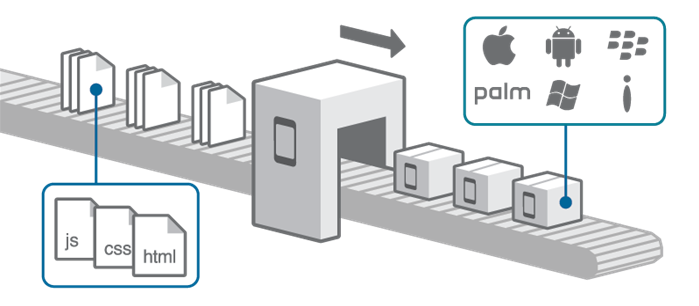


phonegap picture explanation.

So that is Phonegap Framework. Now where is the tutorial?
Well, I just share with you the link that I think is good start for developing our skill in building mobile applications. This is for Android version. iOS i dont know. Sorry if you are iOS developer.

1. http://www.adobe.com/devnet/html5/articles/getting-started-with-phonegap-in-eclipse-for-android.html
2. http://www.raywenderlich.com/30734/phonegap-tutorial-a-cross-platform-zombie-app
3. http://www.tricedesigns.com/2013/01/18/my-workflow-for-developing-phonegap-applications/
4. http://phonegap.com/blog/build/getting-started-with-phonegap-and-phonegap-build/
5. PDF tutorial for Android & iOS

Tutorial to setup phonegap in Ubuntu in Android Sdk
6.http://yaizabailen.com/setting-up-an-android-app-build-environment-with-android-sdk-and-phonegap-in-ubuntu-13-04/

If you are Ubuntu user like me and using android studio. Still blur how to start the project. No worries. I manage to find out how it works. Just follow this steps.
1. click link no.6 . In this tutorial,do all the steps until the steps show "build the project".
2. Now click this link. Just follow the steps.(ignore first step,start immediately with Import project when you open Android Studio)

This is the screenshot from my Ubuntu and run phonegap app with Android Studio Emulator


If you have any link or documents or questions, feel free to share with me in the comment section so that other reader who are searching for this knowledge can get benefit from you. :) cheers. Have a good day

Trip to India

Well, for the last 3 weeks of my 3 month of my semester break, I have decided to visit my grandparents in India and also enjoy my time there. But turn out it become a sad trip. As it turn out, my grandfather is checked-in at a hospital in ICU due to not feeling well during my first day in India. It seems that he had some sort of internal bleeding in his brain but he managed to recovered from it. And after that another new problem arises whereby he had difficulties in breathing. So he have to transfer to another hospital at Chennai to aid his health due to not enough facilities to cure my grandfather problem. But thanks to Allah. On my last 3 days in India,My grandfather show some improvement in his health,getting recover in good pace.

Not a good story to hear eh? I know. But throughout this trip, I have observe myself and people around me.
Thing I learned is that.

1. Always be grateful for what Allah have give you.
2. Do good deeds before you fall sick.
3. Save some money for future needs. We don't what will happen on that time.
4. Love the people who still around you. You wont meet them again if they die.
5. Get adapt to a place quickly. Don't show off that you are Malaysian guy in other people place. Just stay low.

What about pictures?
Well,most of the pictures i took, I upload at my Instagram. So,feel free to check at there.
here is the link

Tips to make Android Phone on best performance all the time

How to make android phone fast?
How to fix insufficient storage?
How to fix lag?
How to remove stubborn apps or remove samsung apps?

The questions that I typed above is the typical question raised by Android users since Day 1 of the phone usage. So,how I fix this major issues on my phone? Well,let me share with you. Its up to you,to follow it or not.I just share my knowledge. :-)

1. ROOT

Seriously? I don't want to broke my warranty. Don't worry,you can "unroot" it.
Why root? Because the rest of the tips,the apps that you need will need root access.
What is root? I don't want to blah2x about this. Just watch this video,to make you understand.
So how to root? well just google "how to root <android version><phone model name>".
My tips is just click the result from "xda-developers." You can trust them. Or try search in Youtube to make you understand the steps clearly. Or ask your friend who know rooting stuff to root your phone.

2. Reboot/restart your phone after your phone is fully charged.
Yes,it sounds crazy but it works for me. just reboot if you finish charging up your phone. Works better if you turn off your phone,and turn it on after 10 seconds.
Use this app to reboot in one click. Its call reboot widget.

LinkWithin

Related Posts Plugin for WordPress, Blogger...
 
Life Is Simple LA! © Life-Is-Simple-LA!!!-2010-till now.