Selalunya kalau didalam kelas atau diluar kelas,jika kita tidak faham terhadap sesuatu perkara,kita akan buka YouTube pastu cari sebuah video tutorial.Kini,perkara itu telah lagi dipermudahkan dengan YouTube EDU .
YouTube telah membuka sebuah page dimana para pelajar dari sekolah rendah hingga peringkat Universiti boleh belajar pelbagai perkara yang terlibat dengan akademik mereka.Sebagai contoh Calculus,Physic,dan sebagainya.Selain itu,video tentang pengetahuan AM pun ditunjukkan dalam page itu dengan nama Lifelong Learning .Agak berbaloi jika gunakan masa cuti dengan perkara berfaedah ini.Daripada duduk stalking awek kat facebook/gosip atau buat benda tak baik. Gunakan masa itu sebaik-baiknya dengan tambah ilmu baru.
Ini adalah salah satu video yang saya rasa kagum dalam page itu.
Labels:
Android,
Info

Android Apps for students in Malaysia
It's about 4 month(I think),I have been doing research about fully use my android phone.Especially as a student.
I still remember I "Googled" android apps for student but I am not happy with it.So now,I share to you guys based on my little research.All this app are free.All the apps picture are taken from android market.
1.Color Note


I still remember I "Googled" android apps for student but I am not happy with it.So now,I share to you guys based on my little research.All this app are free.All the apps picture are taken from android market.
1.Color Note


What I like about this app is that you can put all your reminder like submit quiz/assignment,checklist and etc.
Most of all,its colorful.To make this thing works,Install this app on your Phone Memory.To use it,as usuall...long press on your phone screen,choose widget,& then choose Color Note.
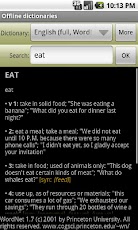
2.Offline Dictionaries
Most of the class I take in UIA,I faced having to understand some High-level english grammar.Since I have an Android Phone,why don't I install an app to make it easier.Most of dictionary apps need to be online.Seriously,not a joke.The difference this free version and pro version is PRO version is ad free.Itu je...
Make sure you open this app after install from android market,you need to download dictionary library.If not,it is useless app.So,make sure have fast wifi-signal/Internet.
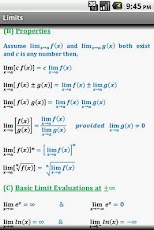
3.Calculus Quick Reference
I love this app.It makes my life easier to remember all important formulas before quizzes and exam.hahahhaa
So,if you taking Calculus,you should have this.It contains all the formulas for limits,derivatives,integration.

Labels:
Tutorial
Tutorial mencantikkan desktop anda
Terus terang saya dah boring dengan wallpaper saya,so nak kata saya selalu tukar wallpaper saya.Tujuannya,nak cantikkan desktop.Tapi,saya dapat rasakan itu cari "old school".So,dalam post ini,saya share cara lain untuk mencantikkan desktop anda.

1.Gunakan transformation pack
--transformasi seluruh icon,loading bar,start menu kepada OS lain/awesome
--leh download kat skinpacks.com (itu yang terbaik)
--just download dan install.Make sure download ikut OS 32-bit/64-bit.
Kalau silap,setting rosak,windows corrupt.
2.Rainmeter.

 --Yang terbaik saya gunakan.Agak susah pada awalnya untuk paham setting dia ,lepas belajar dan
korban masa,anda akan faham.
--Ini website dia www.rainmeter.com
--make sure awak baca tutorial dia.Banyak ada di Youtube/blog rainmeter.Jgn risau pasal notepad coding.Takda apa2 pun.
lifehacker tutorial using rainmeter
--ni link skin dia,(make sure install dahulu rainmeter,lepas install any skin can be applied)
http://rainmeter.deviantart.com/gallery/
http://browse.deviantart.com/customization/skins/sysmonitor/rainmeter/?order=5
http://www.customize.org/rainmeter/skins
http://www.flickr.com/groups/lifehacker-desktop-showandtell/pool/
rainmeter forum
forum lowyat rainmeter link
3.Tukar explorer.exe windows aka custom windows 7 themes

--yang ini tahap bahaya.Download file theme
http://slodive.com/freebies/22-awesome-windows-7-themes/
all the best.Selamat mencuba.

1.Gunakan transformation pack
--transformasi seluruh icon,loading bar,start menu kepada OS lain/awesome
--leh download kat skinpacks.com (itu yang terbaik)
--just download dan install.Make sure download ikut OS 32-bit/64-bit.
Kalau silap,setting rosak,windows corrupt.
2.Rainmeter.


korban masa,anda akan faham.
--Ini website dia www.rainmeter.com
--make sure awak baca tutorial dia.Banyak ada di Youtube/blog rainmeter.Jgn risau pasal notepad coding.Takda apa2 pun.
lifehacker tutorial using rainmeter
--ni link skin dia,(make sure install dahulu rainmeter,lepas install any skin can be applied)
http://rainmeter.deviantart.com/gallery/
http://browse.deviantart.com/customization/skins/sysmonitor/rainmeter/?order=5
http://www.customize.org/rainmeter/skins
http://www.flickr.com/groups/lifehacker-desktop-showandtell/pool/
rainmeter forum
forum lowyat rainmeter link
3.Tukar explorer.exe windows aka custom windows 7 themes

--yang ini tahap bahaya.Download file theme
http://slodive.com/freebies/22-awesome-windows-7-themes/
all the best.Selamat mencuba.
Subscribe to:
Posts (Atom)
LinkWithin


