2015 Life as Fresh Graduate

Well its been long time,I have not write a post in my blog. A lot of changes I see in this blogger platform. Nuffnang ads still running and shockingly there are people still viewing my old articles. Thats fantastic. And guess what, I am not an ICT student from International Islamic University Malaysia anymore. I am IIUM ALUMNI. Alhamdulillah.

Now as you read the title, yeah 2015 is a year that I learn alot about how painful life is. I felt cheated from what I know during my studies in University and school. "Menara Gading" bullshit, high paid salary bullshit, degree scroll will make you do better in life. Turns out it not. You work to pay your bills. WTF ? Hahaha, what a hard way I learned it. Well its all depends on what god have planned on you. But I have learn some to get me started on my new chapter of my life.

deep meaning for me
So I what I have learned so far about life apart from my technical skills.

15 websites to look jobs in Malaysia

If you reading this post,means you really want to look for a job because you just graduated or want to look for new place to work. Let me save your time on searching for websites to apply and in mean time make your CV look awesome.

1. https://www.linkedin.com/
Sign up to linkedin. Make a good profile of yourself & search position that you wanted in the search field which located on top of the linkedin website.


All the best in finding a job. Just email your CV to more than 100 companies.


MIT GSL 2014 Malaysia

Yeah, I have join as first batch for MIT Global Startup Lab Malaysia. Tak percaya ?. This is profile link.

Its a new experience for me to join a 7 week of startup bootcamp by balancing my self with Ramadhan challenges and crazy stuff throughout the journey. But it do help me a lot for learning on starting a startup

Basically what is this program all about?

Top facts about cellphones

Cell phones / Smartphones/ Handphone / handset. Almost everyone of us using it for communications purposes. But do you know any facts about it. Here some of it. Click this picture to enlarge.


credit to khumo for suggesting and this infographics from ipmart

Tutorial to create Windows 8.1 AIO iso file

Alhamdulillah, I have manage to combine 64-bit and 32-bit Windows 8.1 installer into single installer known as AIO(all-in-one). I really want to do this because not everyone have same computer specification to install either 64bit or 32bit. And I dont want to reformat my thumb-drive to create bootable USB for windows 8 64bit/32bit. So, I "Google" around to find tutorial on how to do Windows 8.1 AIO .ISO installation file and I found one, and spend more than 2 hours to try it out. So let me show you,how I did it.


Before you begin,make sure you have this software's in your computer.
1.  Windows 8.1 Professional 32-bit and 64-bit installer .iso file.
2. .Net 4.5 Framework
3. Windows Assessment and Deployment Kit (Windows ADK)
4. Winrar / 7-Zip

Digi Challenge for Change


I have join a DiGi competition. What is this challenge about?
About DiGi Challenge

Support me by vote me,by click this link.
Digi Challenge For Change 2013

Hello 2014


Wow time really move fast. Many new things I have learned through out the year 2013. Sweet and sour memories occurred, meet new people,regrets, excitement, & hope.

So any new year resolution? . You know what, screw it. I don't want any new year resolution. Because I am not working through it. But I have set goals since 1 Muharram 1435H.
What is it? 

ermm I forgot actually.

But since i blog post about my goals. I have made up some list.

1. Khatam quran
2. Workout
3. Learn to Code
4. Create an Android App with HTML5 & Native Android
5. Prepare for Startup
6. Graduate
7. Travel alone/with friends
8. Explore Linux OS

It might be a small list but let me complete this list first because the outcome is big and to achieve this goal,i have to do a lot of preparation and work towards it. Pray for me. :)

I you still don't know what to do in 2014 or want to revise back your goals. Here some link for inspiration

All the best in the year 2014. Remember to Stay Focus and also pray success not only for yourself but for everyone you loved


Pear OS 8 Review

Pear OS 8. I have never heard it before until I read a post in a tech blog about it. And I was amazed with the features. What amazed me was, it is a Ubuntu based distro (distribution) and design interface like Mac OS.

Ubuntu + Mac OS = WT*?
So,i think for a while. Google some info about Pear OS. And i decide to delete my Ubuntu 12.04 and install Pear OS 8 and dual-boot with windows 7 in my laptop. You dont believe it dont you?
Here is some screenshot.

just sudo update after installation
So, now how to install it? The installation is pretty much same like installing Ubuntu on your computer. Nothing much difference. Here is the download link
boot screen

Phonegap Android Tutorial links

"tutorial to build Android App with phonegap"
"HTML5 Android app phonegap"
"how to build android app with phonegap"

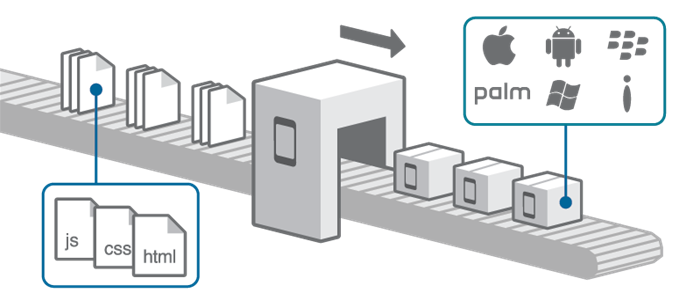
For the past few months I am searching at Google on how to create an android app with HTML5 with phonegap framework. But i am not satisfy with the tutorials to start. But with the patience and help from God. I found some tutorial at least to learn the basic part. Maybe later with try and error, I hope I can build a good android HTML5 app with Phonegap framework. By the way, you may wondering what is Phonegap framework? . Well watch this video to understand more.


phonegap picture explanation.

So that is Phonegap Framework. Now where is the tutorial?
Well, I just share with you the link that I think is good start for developing our skill in building mobile applications. This is for Android version. iOS i dont know. Sorry if you are iOS developer.

1. http://www.adobe.com/devnet/html5/articles/getting-started-with-phonegap-in-eclipse-for-android.html
2. http://www.raywenderlich.com/30734/phonegap-tutorial-a-cross-platform-zombie-app
3. http://www.tricedesigns.com/2013/01/18/my-workflow-for-developing-phonegap-applications/
4. http://phonegap.com/blog/build/getting-started-with-phonegap-and-phonegap-build/
5. PDF tutorial for Android & iOS

Tutorial to setup phonegap in Ubuntu in Android Sdk
6.http://yaizabailen.com/setting-up-an-android-app-build-environment-with-android-sdk-and-phonegap-in-ubuntu-13-04/

If you are Ubuntu user like me and using android studio. Still blur how to start the project. No worries. I manage to find out how it works. Just follow this steps.
1. click link no.6 . In this tutorial,do all the steps until the steps show "build the project".
2. Now click this link. Just follow the steps.(ignore first step,start immediately with Import project when you open Android Studio)

This is the screenshot from my Ubuntu and run phonegap app with Android Studio Emulator


If you have any link or documents or questions, feel free to share with me in the comment section so that other reader who are searching for this knowledge can get benefit from you. :) cheers. Have a good day

Trip to India

Well, for the last 3 weeks of my 3 month of my semester break, I have decided to visit my grandparents in India and also enjoy my time there. But turn out it become a sad trip. As it turn out, my grandfather is checked-in at a hospital in ICU due to not feeling well during my first day in India. It seems that he had some sort of internal bleeding in his brain but he managed to recovered from it. And after that another new problem arises whereby he had difficulties in breathing. So he have to transfer to another hospital at Chennai to aid his health due to not enough facilities to cure my grandfather problem. But thanks to Allah. On my last 3 days in India,My grandfather show some improvement in his health,getting recover in good pace.

Not a good story to hear eh? I know. But throughout this trip, I have observe myself and people around me.
Thing I learned is that.

1. Always be grateful for what Allah have give you.
2. Do good deeds before you fall sick.
3. Save some money for future needs. We don't what will happen on that time.
4. Love the people who still around you. You wont meet them again if they die.
5. Get adapt to a place quickly. Don't show off that you are Malaysian guy in other people place. Just stay low.

What about pictures?
Well,most of the pictures i took, I upload at my Instagram. So,feel free to check at there.
here is the link

Tips to make Android Phone on best performance all the time

How to make android phone fast?
How to fix insufficient storage?
How to fix lag?
How to remove stubborn apps or remove samsung apps?

The questions that I typed above is the typical question raised by Android users since Day 1 of the phone usage. So,how I fix this major issues on my phone? Well,let me share with you. Its up to you,to follow it or not.I just share my knowledge. :-)

1. ROOT

Seriously? I don't want to broke my warranty. Don't worry,you can "unroot" it.
Why root? Because the rest of the tips,the apps that you need will need root access.
What is root? I don't want to blah2x about this. Just watch this video,to make you understand.
So how to root? well just google "how to root <android version><phone model name>".
My tips is just click the result from "xda-developers." You can trust them. Or try search in Youtube to make you understand the steps clearly. Or ask your friend who know rooting stuff to root your phone.

2. Reboot/restart your phone after your phone is fully charged.
Yes,it sounds crazy but it works for me. just reboot if you finish charging up your phone. Works better if you turn off your phone,and turn it on after 10 seconds.
Use this app to reboot in one click. Its call reboot widget.

Tutorial to a create Google chrome app extension

Hey guys,in this post,I am going to share with you on how to create a simple Hello World app for Google Chrome App or extension. Why Hello world? Why not a tutorial to build other app?

Ok, lets make things simple. First of all,based on my understanding, in order to create a Google chrome app/extension. It is just like build a html website and package it with manifest.json files.
In Google chrome app/extension. It's just need a file with
  • a manifest.json file
  • a .html file
  • a .css file
  • a. javascript file (can also include jQuery inside javascript)
Take note here,please don't include javaScript code's in HTML file. Chrome hate it! Make sure save it in separate file. So,if you good with building websites, i dont think that will be a problem. Its same.

So,lets start. All you need is ideas,a Chrome web browser and a text editor.

1. Create a folder to save all your files inside. Can put anywhere,make sure you remember it. Prefer to put it in Desktop(for windows). Like me,i create in Home folder in Ubuntu/Linux. So,name anything for your folder. Like me,i create a folder called "chrome app".

How to install Java jdk in Linux/Ubuntu

Hey there,since i am IT student. We all need to have java in our computer. So, if you using Ubuntu,how to install it? Well, luckily I found a tutorial in YouTube. It is easy. Just make sure you good internet connection. The installation will take more than 5 minutes.

So,first thing first. Open Terminal.

This are the command used. The first 3 steps is for preparing the installation process.
PS:// when you type sudo for first time, it will ask your PC password,just type it slowly. you will understand why.

1. sudo apt-get install python-software-properties
2. sudo add-apt-repository ppa:webupd8team/java
3. sudo apt-get update
4. sudo apt-get install oracle-java7-installer

If you want to understand more,please watch this video. Have a nice day :)

Install Android Studio in Linux Mint 14

Well, since i switched from windows into Linux. I need to learn many thing because the environment and software installation are different here in Linux compared to windows. When i want to install the new Android SDK which is the Android Studio. I dont know how to install. So,I googled on to how to install it. :)

Alhamdulillah,I found a simple tutorial and it worked. :)
Here is the link
Eventough the tutorial is for UBUNTU 13.04 ,but it still works. Just follow exactly.


But before that make sure you have installed Java JDK to avoid problem.

S4 stress test

Ok this is a video about strength test conducted in Samsung Lab at korea. I dont know whether it is in North or South Korea. Just watch this video to see whether Samsung Galaxy S4 is strong or not.

Turning Normal TV into Internet TV or Smart TV

I always ask to myself on how to turn normal TV into an Internet TV. Or should I say a Smart TV.After few while I surfing in Internet, I finally found it. It is a very cheap solution and it is powered by Android. Cool is it?

taken from internet

Well, how it works?.
Its pretty simple. Just connect HDMI cable to the device & your tv. Connect Android mini stick power supply to the device. Once the device is on, just change the TV source into HDMI. After that, you will see a usual Android tablet interface.Those who use Android will understand what I am saying. Later, open the wifi setting under Settings, connect the device to your home/office Wifi network. And tadaaa, you are having an Internet TV powered with Android.

OK watch the video to understand more.

Explanation of hudud

Hey there, how are you? Since the general election is coming. A lot manifesto is propagated by both sides of party. But what makes me interested is about applying hudud law. The moment we listen the term "hudud" we already think about chopping human parts. Well,thats not hudud. My dear friends, I am not an Ustaz to explain about hudud but I am sharing some videos here, so that you can understand easily without reading long text that makes you sleepy. :)


Project LED Music Tree

Basically what I want to share here is, Me and my friends come out a crazy ideas when we were hanging out. We were thinking to do something awesome before we graduate from our University. The result is,in our Kulliyah(faculty in Arabic) ..we have trees. so why not we decorate the tree with LED lights and it can follow up with music pulse. The concept is just use Arduino Micro Controller Board, LEDS ,and of course batteries as power supply.

Watch this video,so that you can visualize what I am sharing with you.


Its just a fun idea. We are planning to do it during our final semester before our Industrial Attachment.Pray for our success. If you want to donate,feel free to do so.

tutorial to build windows phone app

Now I am learning windows phone app after learning developing Android app. Well,I just learning just for fun to understand on how these app's works and to appreciate on how developer's developing their own app.

So,if you want to learn developing Windows Phone App. Just click these two link's for tutorials.
But before that make sure you have installed the SDK. It is recommend to download this SDK for Windows 8 user's.

Download 
or
Download(for offline version)

LINKS
1.everything about Windows Phone App developement -> LINK

2. Tutorial 1 
3. Tutorial 2

running the emulator

How to learn code in Internet for free

I found a website called code.org
It is a website where it provides links and also free tutorials where we can learn programming in easy and fun way. Besides that, we can learn javascript,Ruby,Phyton in online. Wow!

Why I like to learn in this website is,I dont need a software or compiler or setting to do it.
Just a browser and a Internet connection.

Before I know this website.I used codecademy. It was awesome. You should try now.
Anyone can code.

And you know what Will.i.am is also learning how to code. You don't believe it? Watch this video

LinkWithin

Related Posts Plugin for WordPress, Blogger...
 
Life Is Simple LA! © Life-Is-Simple-LA!!!-2010-till now.